POS for variety stores and pound shops
Thousands of items, a till that never gets lost
Batteries, kitchenware, stationery, toys and household goods, each with its barcode. You scan and charge; if a new item isn't set up yet, you create it on the spot without leaving the till. And you know what to restock before it runs out.
- From €19.90/month
- No lock-in
- Works offline
Built for
- Variety stores
- Pound and dollar shops
- Homeware and kitchenware
- Stationery and gift shops
- Household goods shops
A variety store's headaches, sorted
“A new item arrives and the till doesn't know it”
Quick add when scanning
If you scan a code that isn't in the catalogue, the POS lets you create it right there (name, price, VAT, category and stock) and adds it to the receipt. The customer doesn't wait while you go to the back-office computer.
“I've got thousands of products and I'm not typing them in one by one”
Your catalogue from a file
You upload your supplier's list or the one you export from your current till, as CSV or Excel. Bipe recognises which column is the code, the name, the price and the VAT, and you check it before importing.
“I always run out of batteries at the worst moment”
Minimum stock and order list
You set a minimum for each item and Bipe shows you what's below it. If you turn on supplier orders, you prepare the order, send it by email or WhatsApp and when it arrives the stock is added automatically.
“Some items arrive without a barcode”
Your own code and label
For an item with no code you give it one of your own and print a label with the barcode and price. And if it has no label, you search for it by name at the till.
“Three for £2 and the second at half price”
Offers that apply themselves
Buy one get one free, 3 for 2, “3 for €2”, the second unit at X % off or a discount, per item or per category, with start and end dates. At the till, the offer applies itself.
“I don't know what sells and what just sits on the shelf”
Best sellers and margins
On the dashboard you see the best sellers and the average ticket. On the Pro plan you also get the metrics and the margin of each item, so you know what to reorder.
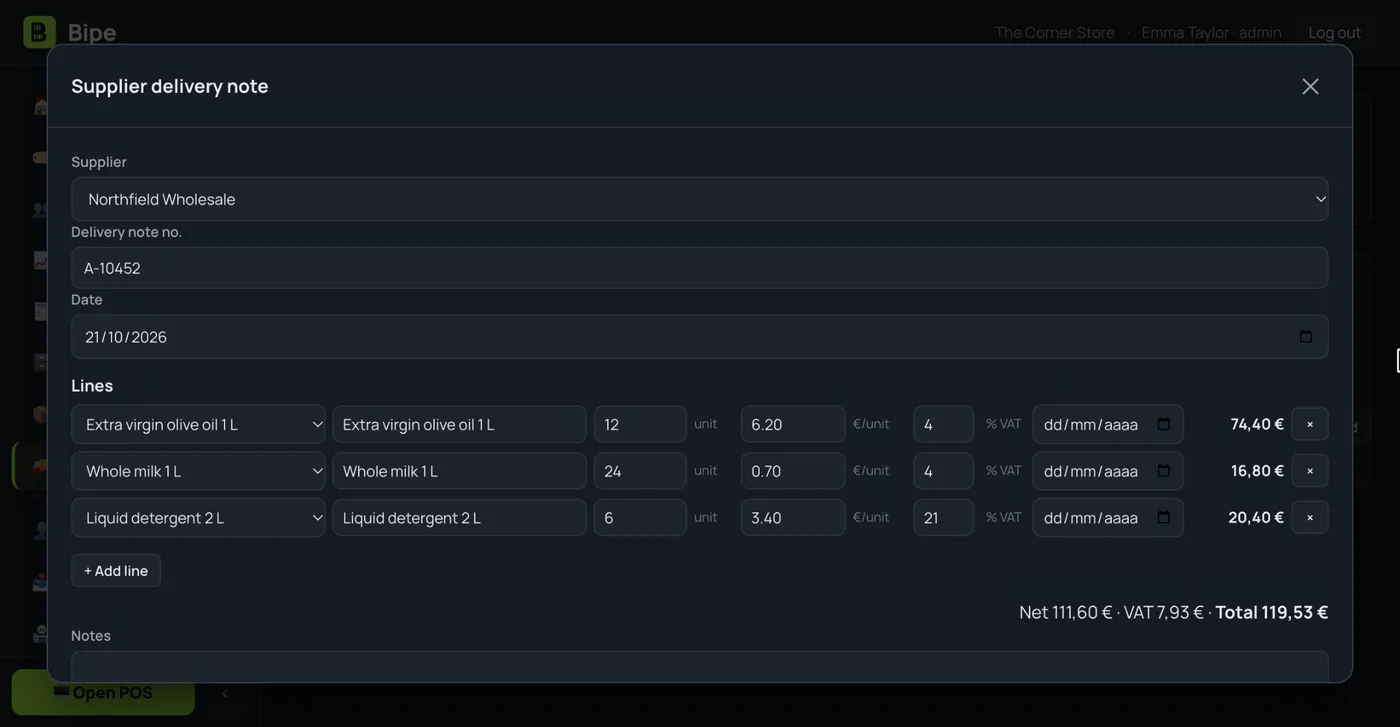
The warehouse order, in stock in minutes
You enter the delivery note with quantities and cost and each item's stock goes up by itself. On the Pro plan, AI reads the delivery note from a PDF or a photo and suggests the lines.
- Delivery notes and suppliers, with what you owe them
- Minimum stock and a “what do I need to order” list
- Stocktake with the scanner, without closing the shop
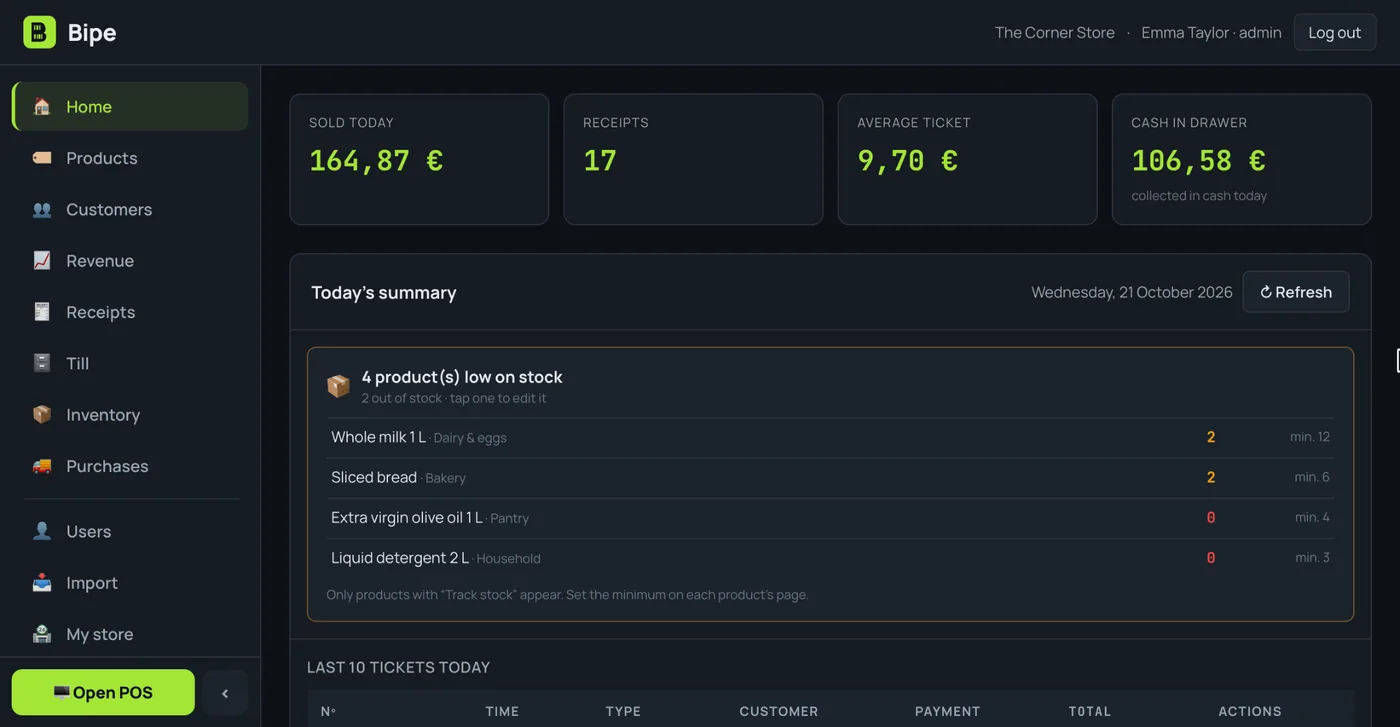
Your store at a glance
Today's sales, receipts, average ticket and cash in the till. And an alert with the items that are running out.
- Reads EAN-13 and EAN-8, with several barcodes per product
- Margin report and one for your accountant (opens in Excel)
- From the shop computer or from your phone
Your variety store, from the warehouse order to closing the till
This is how a variety store POS is used on a normal day, with features Bipe already has.
9:30 · The order arrives
You enter the warehouse delivery note and stock goes up by itself. On the Pro plan, AI reads it from a PDF or a photo.
10:00 · A new item
You scan a mug that wasn't set up: you enter the name and price at the same till, it goes onto the receipt and stays in the catalogue.
12:30 · Queue at the till
Beep, beep, beep: the 3-for-2 offer on notebooks applies itself and you take cash, with the change worked out, or card.
17:00 · A return
A customer returns a toy: you find the receipt, process a full or partial refund and the stock goes back by itself.
19:00 · What to order
You check the list of what's below minimum and prepare the supplier order without walking every aisle.
21:00 · Closing
Cash count of notes and coins and Z report. On the dashboard, the day's sales and the average ticket.
Do you also sell food and drinks? See the supermarket POS, with scales and expiry dates. On the blog: EAN barcodes in your shop.
Bipe in 10 seconds
Short videos from our YouTube channel: everyday situations in your business and how they are handled with Bipe. The videos are in Spanish.

How long does your till take to charge?
A sale from start to finish with Bipe: add what the customer is buying, choose how they pay and you're done.

Paying €1.20 by card: do you set a minimum?
A small card payment at the counter: in Bipe you mark it as a card payment, and any minimum is up to you.

Goodbye to the credit notebook
Each customer has their own account: what they buy on credit and what they pay back is recorded in Bipe, with every movement.
Start small, grow when you're ready
VAT included. No lock-in. Every plan comes with 15 days free.
- Up to 3,000 products
- 1 user
- Full POS, till and Z closing
- Scanner, scales and offers
- Stock, delivery notes and expiry dates
- Refunds and receipt history
- CSV catalogue import
- Customers and credit
- Advanced reports
- Several cashiers
- Unlimited products
- Unlimited cashiers, with PINs and permissions
- Everything in Mini, plus:
- Customer accounts (credit)
- Metrics, margins and accountant report
- Read price lists and delivery notes with AI
- Everything in Pro, plus:
- Receipts to customers by WhatsApp or email
- Priority support
- Personalised onboarding
- Assisted catalogue import
- Early access to new features
- Multi-shop (coming soon)
Price per shop per month. Change plan whenever you like. Secure payment with Stripe. During the trial you get every feature.
Variety stores' questions
Does Bipe work as a variety store POS?
How many items can I have?
Can I import my catalogue from Excel?
What happens if I scan an item that isn't set up?
What about items without a barcode?
Does it warn me when something runs out?
How much does the variety store POS cost?
Guides for your shop
Is your business different?
More items sold, fewer gaps on the shelves
Try Bipe free for 15 days. No lock-in: cancel whenever you like.